Pages

Monday, May 19, 2014

Count Related Field

How many times we have cursed SharePoint for not able to get the item count natively without writing code or using workflow. There is an easier way which I stumbled up recently but may be some of you have already figured this out earlier. I wanted to document this so this can be useful for someone like me who is always interested in code.

Recently when I was working on a project where there is absolutely no server side code, pretty much everything was done at the client side. There was a need to get item count per category. This is simple on the list because we could just do a group by and we would know how many items in a particular category, but we wanted to use those number to draw chart. The group by numbers will not be useful and we cannot use char web part (yes I know chart part is gone in 2013 but this project is still in 2010).

How do we do this? We had a lists of categories in a list which is used as lookup for the categories column. We initially thought of writing a client side script that would count items and add it to a field. But this needs to be triggered every time a new item is added to the list. I was trying to create a new field and accidentally I chose lookup field and I noticed that there is a field called count related in the options when i chose the looked up list a source. When I created a field I could immediately see item count for all the items in the lookedup list. Form now on this becomes easy to use this chart part or anything you want even in code that would need to do count.

Figure shows how to create Count Related field

Create new List column Lookup


Item count corresponding to categories


Please leave your feedback in comments.

Wednesday, April 16, 2014

Get Site URL in Javascript

This post is more like a note of remembrance.I have been playing with Angular lately (I am not a expert just starting to explore). Thanks to my colleague Javed for his help. I was trying to create a web part to read information from the SharePoint site. I was faced with problem when trying to combine the CSOM with AngularJS. This could just be my poor Angular skills causing. But all i was trying to do was get the URL so I can do a GET using $http. I think the problem was in ExecuteQueryAsync.While trying to investigate I stumbled upon Nik Patel's article talking about getting site collection URL form.

Since we are using more and more javascript and client side development i think this would be a useful information to share.

_spPageContextInfo object is available by default in all SharePoint webpart pages and hence it becomes simple to get the URL as opposed to writing a lot of code to get a site collection URL. Though the returned URL is server relative we could easily form the full URL which can then be used in $http.get() in my case

here is how i used it

var url = window.location.protocol + "//" + window.location.host + _spPageContextInfo.siteServerRelativeUrl; 


// Form the full URL for $hhtp get
url = url + "_api/web/lists/GetByTitle('News')/items"


//Call Http Get
$http.get(url);

Sunday, March 30, 2014

Related Items Column SharePoint 2013

SharePoint 2013 is out for sometime and there are many new features including Client Side Object Model (CSOM) and new services like Translation Service and APP management etc. I am going to share an interesting thing that I stumbled upon today while setting up some POC using SharePoint for Project Management. This is interesting and useful because it becomes handy for setting up business processes in SharePoint.

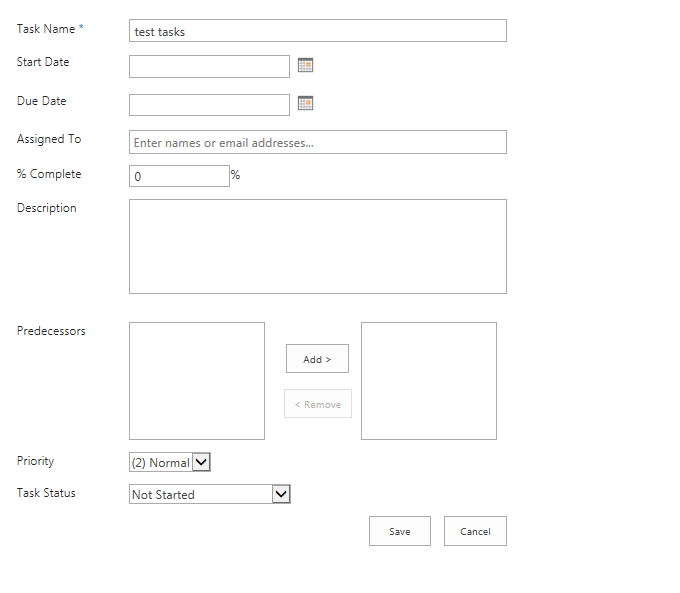
Today while setting up the site I happened to create a Task List and was going through all the fields. I noted a field type called "Related Items". We all would have seen "predecessor" field in SP2010 tasks list and "Related Issues" in SharePoint 2010 issues List. I now got curious to find out about this field because it looks new.


First, I clicked on the field in the List settings page to see information about the field. I did not field any information at all in the description. Next step is to check at the site columns. The field is not visible in site columns. This only means as we all know it is hidden. Now curiosity just shot up and really want to know why this field is hidden and what does this field has to offer and how is this field different from"Related Issues" or "Predecessor". One this is surely certain that this field is custom field type unlike other two fields which are lookup fields.


Now setting out to find out what this field has to offer what better way to find than by creating a task. So I created a new task but strangely enough I could not see the field in new form. This now becomes intriguing because if I am not seeing in New Form I am sure if I will see in Edit Form while editing the item or View Form. But I was in the mission of finding this out. So I decided to edit the item because as we all know we can have the property on the field "Show in New Form" to false but still show in edit form.


I was in the edit form and could not see the field. I was getting anxious because how I can fill the field if it not showing up in New and Edit Form.What is the use of the field that is hidden through out and what is SharePoint trying to achieve with this field? These were some of the question I had and decided to check the View Form.We all know that View form is readonly view of Edit Form, so I wasn't excepting anything but thought that it could be information only field that SharePoint auto populates.


With this thought I opened the View form and contrary to my impression i saw a link right across "related items" field. This is the first place I was able to see Related Items tied to an task item in the list. I went ahead and clicked the Link which brought up a Pop up which by default points to the site collection. Eureka. The "related Items" is allowing me to add items that are related to this tasks. I selected a document from document Library and clicked "OK" boom! the document is linked to the tasks. I was able to add multiple items at a time and even was able to upload a document to a library right there in the pop up. So if the document or the item is not available in SharePoint you will be able to add it and then link it all in one shot without having to close the pop up.This is huge.


 Now why do I think this field is useful?

The field is a big step forward where in enterprise when some one is assigned to work on a tasks the person creating the tasks can add all these related items as reference for the other person to work on. For example the project manager can add all reference to all project items corresponding to a tasks as related item.The reference items can be independently managed and updated. Example Project Plan, Resource Availability.We can add reference to any thing that is in SharePoint. It could be an Issue, list item etc.

This to me is better than having as attachment because the references are independent of the tasks item. This is makes a true relational setup and easy to maintain single version of truth that is referenced.

Right now we will only be able to add items in the present site collection but if  future if Microsoft allows us to add items stored externally or in different site collection which would makes this feature a jaw dropping feature in SharePoint until we unearth another hidden feature.

Hope you find this one useful and let me know your thoughts and suggestion in comments. I will be exploring SharePoint 2013 and until then happy SharePointing.